
SELL · SCHEDULING
Fill Your Calendar Without the Back-And-Forth.
Online booking for walks, sessions, classes and calls, on a page made from your Brand Brain. People pay when they book, and reminders go out for you.
No code. No credit card. You stay in control.
REPLACES One login instead of all of these.
THE HARD PART
A Calendar Isn’t a Booking Business Yet.
Most booking tools give you a link, then leave you to chase payments, send reminders and deal with no-shows.
The back-and-forth
“Does Tuesday work?” “How about Thursday?” Every booking takes five messages.
Unpaid no-shows
Booked slots with no payment are the easiest ones to skip.
Reminders by hand
Texting everyone the day before is a job nobody signed up for.
WHAT YOU WANT INSTEAD
A booking page that only shows free times, takes payment and sends every reminder for you.
HOW IT WORKS
Your Booking Page in Four Steps.
Describe what you offer. Floloop builds the page, fills your calendar and reminds everyone.
Describe what you offer.
Write a sentence or pick a Blueprint. Your AI team sets up your services, prices and hours.
01
STEP 1 OF 4
Customers book a free time.
Your booking page only shows the times you’re free. They pick one and pay.
02
STEP 2 OF 4
Reminders go out for you.
Confirmations and text reminders go out on their own, and customers can move their own booking.
03
STEP 3 OF 4
Your week fills itself.
Every booking lands in your calendar, already paid.
04
STEP 4 OF 4
FEATURE HIGHLIGHTS
More Than a Calendar.
Your AI team builds the booking page. Then you control every service, hour and price.
BLUEPRINTS
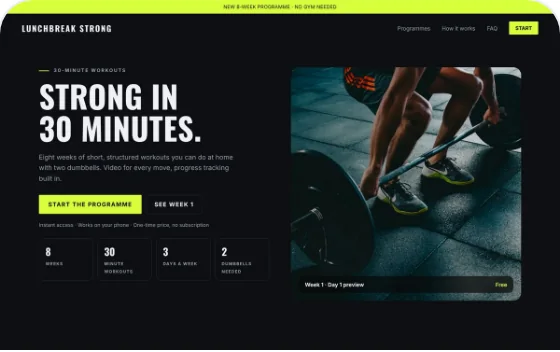
Start From a Proven Blueprint.
Pick a booking page that’s already set up for what you offer, then make it yours.
BUILT IN
Everything Online Booking Needs, Built In.
Online booking software for small businesses with a booking page, payments up front, text and email reminders and a calendar that only shows your free times.
SET IT UP

Your booking page
Services, prices and your story, written and designed for you.

Availability rules
Set your hours, gaps between bookings and how far ahead people book.

Classes and privates
Run group classes with set spots alongside private sessions.

Services and prices
As many services as you offer, each with its own length and price.
GET PAID

Paid when they book
Customers pay at checkout, so every booking arrives already paid.

Offers and class packs
First-session discounts and multi-class passes, set up in minutes.

Book from your bio
Let people book straight from your Instagram or TikTok profile.

Your own domain
Your booking page lives at your own name, with HTTPS included.
KEEP THEM COMING

Booking reminders
Reminders go out before every booking to cut down on no-shows.

Easy rescheduling
Customers move their own booking from the confirmation or reminder.

Every client saved
Every customer and every booking, saved together in your CRM.

Email campaigns
Fill quiet weeks with a friendly email to your past customers.
GROW IT

Found by locals
Your booking page is set up so people searching nearby find you.

Booking analytics
See which posts and ads bring in bookings, in plain numbers.

Loyalty and points
Reward your regulars with points they can spend on their next visit.

A built-in blog
Publish posts that help locals find you and trust you sooner.
FROM IDEA TO BUSINESS OWNER
The Idea in Your Head, Made Real.
A service business starts with something people already ask you for.
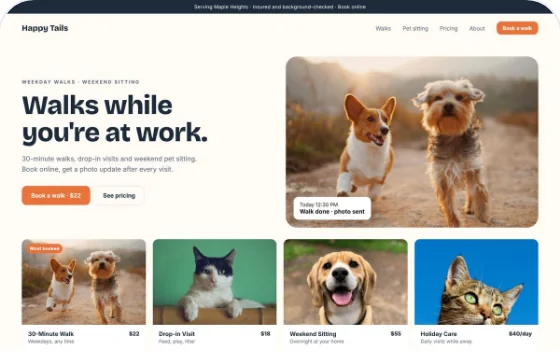
The neighbour with a dog-walking business
Your first service: a 30-minute weekday walk, booked and paid online.
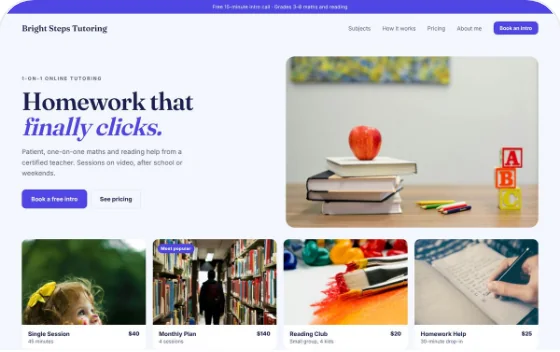
The teacher with a tutoring practice
Your first service: one-to-one sessions on video, booked around school pick-up.
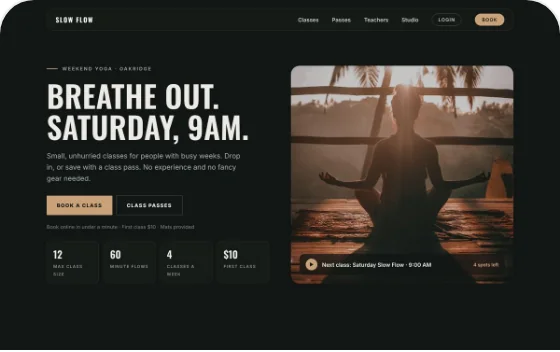
The yoga teacher with a full class
Your first service: a Saturday class with 12 spots, booked and paid in advance.
ALREADY SET UP
The Fiddly Parts Come Filled In.
Buffers, cancellations, reminders and confirmations are set up when your booking page is, and you can change any of them.
Gaps between bookings
Give yourself time to travel, reset or breathe between sessions.
Cancellation policy
Say how late people can cancel, in plain words, shown before they book.
Reminders
Texts and emails go out before every booking, without you sending a thing.
Confirmations
Every customer gets their booking details and a calendar invite.
REVIEWS
Built by People Starting Out.
Linda Karmala
NJ Homecare
“Using the dashboard and hiring services is so simple even I felt smart with technology.”
Marc Sigal
Via Trustpilot
“The team was professional, responsive, and easy to communicate with throughout the process. Any questions or small changes I had were handled quickly, and I never felt left in the dark.”
Donielle Alexander
Floloop customer
“Jonathan was a great listener and asked questions I hadn’t thought of. Gave me clear expectations and nailed them!”
NEXT STEP · SUPPORT
Now Catch the Calls Too.
Some people still pick up the phone. An AI receptionist answers when you’re busy and books them into the same calendar.
✓
Answers in your voice, day and night
✓
Books into the same calendar
✓
Texts you a summary of every call
QUESTIONS
Online Booking, Answered.
How does online booking work?
Customers open your booking page, see only the times you’re free, pick one and pay. It lands in your calendar straight away.
Can customers pay when they book?
Yes. Payment is taken at checkout, so every booking in your calendar is already paid.
Do you send reminders?
Yes. Text and email reminders go out before each booking, with a link to reschedule.
Can I set my own hours?
Yes. Choose your working days and hours, the gaps between bookings and how far ahead people can book.
Can I run group classes?
Yes. Set how many spots a class has, and it closes when it’s full.
Can customers reschedule?
Yes. They can move their own booking from their confirmation or reminder.
How much does it cost?
See floloop.com/pricing for current plans.
RESOURCES
Learn as You Build.
How to set your booking hours
Guide
Cutting no-shows with reminders
Guide
Taking payment when people book
Step by step
Free templates and guides to get you started
Marketplace · Browse the marketplace →
What Will You Open Bookings for This Sunday?
Built to run next to your job. No code. No credit card. Hundreds of brands already sell on Floloop.